Saturday, January 21, 2012

Saturday, October 29, 2011
NOKIA 5130c-2690c-2700c Nokia Logo Trun Off Check Solution
NOKIA 5130c-2690c-2700c Nokia Logo Trun Off Check Solution Step By Step
A1) flash lhe phone higher version via usb or Fbus
2) usb flashing time computer show usb error?
must check usb connector usb controll driver(remove usb esd)
A1) flash lhe phone higher version via usb or Fbus
2) usb flashing time computer show usb error?
must check usb connector usb controll driver(remove usb esd)
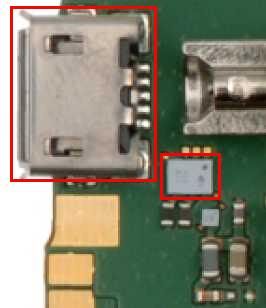
usb flashing and fbus flash 100% done?but phone same nokia logo then trun off?
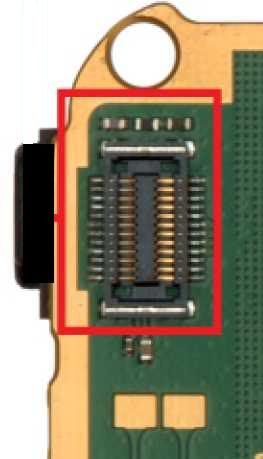
B1) open handset then check display connector or change display(display also make this problem)
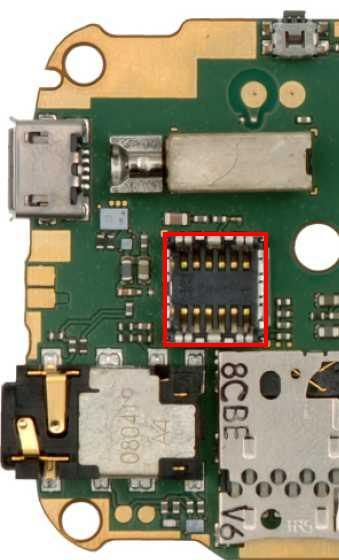
2) remove camera and power on phone with battery,phone still same problem(nokialogo then trun off
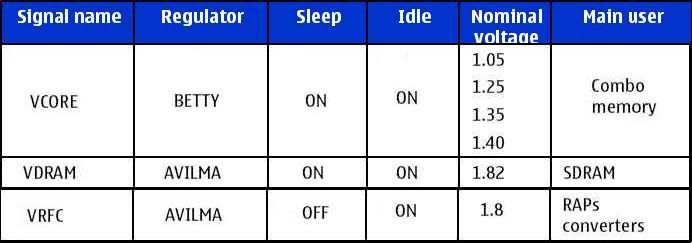
3) check vcore,vio,vdram vrfc volt
this 4 volt controlled by combo ic
vdram,vrfc,vio volt controlled by AVILMA
Vcore controlled by BETTY
this 4 volt is prefect???then one thing is conformed avilma betty working fine
4) reflow or change keypad ic
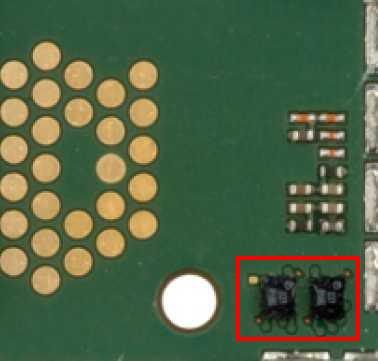
5) Remove MMC ic
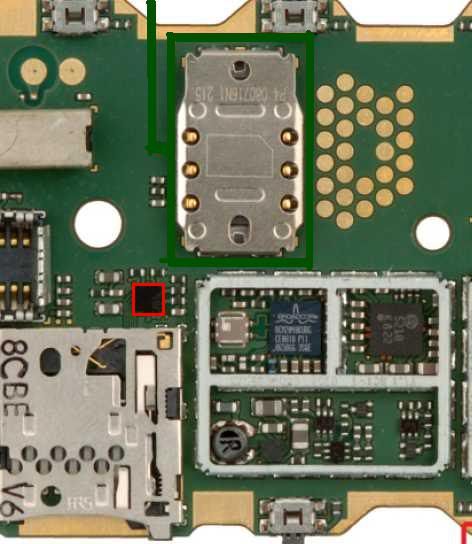
6) BT ic also make this problem(6120 75% nokia trun off bt ic)
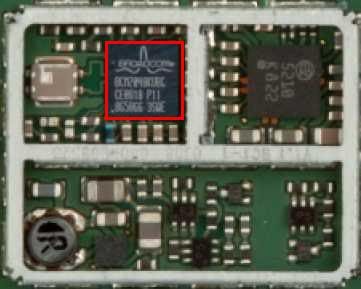
7) finaly reflow or change combo ic
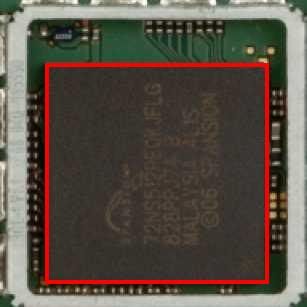
no more option like this cause
thank u for very nice to runing this discussion
Nokia 7710 Full Hardware Solution EXE

7710 LCD no display
7710 Keypad Not working
7710 not Charging Solution
7710 Power Switch On/off
7710 Insert sim Solution
7710 Buzzer Ringer Solution
7710 Speaker and Mic Solution
All Mobile Hardware Repairing Solution In One


Nokia 5230 All Hardware Repairing Solution

Nokia 5230 Lcd Light, Keypad, Mic Way, Not Charging, Headphone mode, Tuch key, Network, Insert sim, Camera, Bluetooth, Speaker Ways, Solution




Nokia Launch Dual Sim Card Model C1 And C2
Picture


Nokia is more popular mobile company in the world. Recently Nokia has launched its new dual sim mobile phone with the name of Nokia C1 and Nokia C2. Other mobile manufacturing companies already launched their dual sim mobile phones. The first phone in the series, the Nokia C1 features a battery standby time of 6 weeks, and comes with standard flashlight, color screen and FM Radio. The users can change between SIMs using a single key.This handset is proposed to be available by the third quarter of 2010 at a price, a (around $37).
As with the new Nokia C1, the Nokia C2 features dual SIM functionality, meaning you won’t need to have more than one mobile phone. Instead, you’ll be able to send and receive texts and calls from both your home and work numbers, with everything appearing in one location.

The Nokia C2, on the other hand, features two active SIMs at the same time. One of the SIMs shall remain under the battery. But however, the second SIM is “hot swappable”- a feature very unique to Nokia, which means it can be inserted and removed at any time when the phone is turned on. And is proposed to be available by the end of 2010.
So, those of you still waiting for a dual-SIM phone accompanied with reliability and durability, it seems your wait is about to get over!! These new Phones are namely C1-00 (1750 INR) C1-01 (Rs. 2200) C1-02 (Rs 2500) and C2 (Rs. 2850) don’t expect any lavish features in these mobiles as they are made to offer basic functionality like FM Radio, Color Screen, Flash Light and Send Messages.
Nokia C1-00
A simple phone to make calls and send text messages, flashlight, FM radio and a super battery up to 6 weeks of use. Estimated price of Rs.1750
Nokia C1-01 and C1-02
The C1-01 C1-02 are very similar phones, the C1-01 includes FM radio, microSD card slot and a VGA resolution camera. C1-02 well, with FM radio, microSD card slot and VGA camera, but also has Bluetooth, Ovi Mail and Chat.
Nokia C2 overview
The Nokia C2 will support Nokia’s Ovi Life service, offering healthcare, agriculture and entertainment advice, and it provides Ovi Mail – bringing email to the mass market in developing worlds. Nokia C2 is the most expensive in this range leaving about Rs. 2850, double SIM, with the tools of Life Tools Ovi, Mail and Chat, FM radio, microSD card slot, VGA camera, Bluetooth and a battery that Nokia says lasts up to 16.5 days of use.
As with the new Nokia C1, the Nokia C2 features dual SIM functionality, meaning you won’t need to have more than one mobile phone. Instead, you’ll be able to send and receive texts and calls from both your home and work numbers, with everything appearing in one location.
The Nokia C2, on the other hand, features two active SIMs at the same time. One of the SIMs shall remain under the battery. But however, the second SIM is “hot swappable”- a feature very unique to Nokia, which means it can be inserted and removed at any time when the phone is turned on. And is proposed to be available by the end of 2010.
So, those of you still waiting for a dual-SIM phone accompanied with reliability and durability, it seems your wait is about to get over!! These new Phones are namely C1-00 (1750 INR) C1-01 (Rs. 2200) C1-02 (Rs 2500) and C2 (Rs. 2850) don’t expect any lavish features in these mobiles as they are made to offer basic functionality like FM Radio, Color Screen, Flash Light and Send Messages.
Nokia C1-00
A simple phone to make calls and send text messages, flashlight, FM radio and a super battery up to 6 weeks of use. Estimated price of Rs.1750
Nokia C1-01 and C1-02
The C1-01 C1-02 are very similar phones, the C1-01 includes FM radio, microSD card slot and a VGA resolution camera. C1-02 well, with FM radio, microSD card slot and VGA camera, but also has Bluetooth, Ovi Mail and Chat.
Nokia C2 overview
The Nokia C2 will support Nokia’s Ovi Life service, offering healthcare, agriculture and entertainment advice, and it provides Ovi Mail – bringing email to the mass market in developing worlds. Nokia C2 is the most expensive in this range leaving about Rs. 2850, double SIM, with the tools of Life Tools Ovi, Mail and Chat, FM radio, microSD card slot, VGA camera, Bluetooth and a battery that Nokia says lasts up to 16.5 days of use.
Unlock iPhone 4.3.2 with Ultrasn0w 1.2.2
Unlock iPhone 4.3.2 with Ultrasn0w 1.2.2
It should be noted though that this release of Ultrasn0w is not a new unlock for iPhones with newer basebands, instead, it only fixes the compatibility issues on the existing devices, which are jailbroken (with preserved basebands: 01.59.00 / 04.26.08 / 05.11.07 / 05.12.01 / 05.13.04 / 06.15.00) on iOS 4.3.2 using PwnageTool 4.3.2 or Sn0wbreeze 2.6.
For iPhone 3GS Only: How to Update iPhone 3GS to 06.15.00 Baseband for Unlock:
Ultrasn0w 1.2.x unlocking requires that your iPhone 3GS is jailbroken with 06.15.00 baseband. Follow the complete guide posted here (with PwnageTool) or here (for Redsn0w) to update your iPhone 3GS baseband to 06.15.00 and jailbreak it on iOS 4.1 / 4.2.1 before proceeding with the following steps.
Note: Updating iPhone 3GS baseband to iPad’s 06.15.00 might result in loss of GPS functionality.
Step 1: First up, you will have to jailbreak your iPhone 4 or 3GS on iOS 4.3.2 and preserve the old baseband using either PwnageTool on Mac, or Sn0wbreeze on Windows. Instructions on how to jailbreak iOS 4.3.2 using PwnageTool can be found here, and for Sn0wbreeze can be found here.
Step 2: Once you are done with the jailbreak, you can now unlock your iPhone on the supported basebands using Ultrasn0w 1.2.2 from Cydia. To do this:
- Start “Cydia” on your iPhone.
- Touch on “Manage” tab on the bottom.
- Now touch on “Sources”.
- Touch on “Edit” and then on “Add”. You will be prompted to enter a url source as seen in the screenshot below. Type “http://repo666.ultrasn0w.com” and touch on“Add Source” to add this repo if you haven’t already.
3. Click the “Search” tab and search for “ultrasn0w” in Cydia and install the package.

Free Huawei Modem Unlocker!
Free Huawei Modem Unlocker!


Supported Huawei Models:
E155, E156, E156C, E156G, E160, E160E, E160G, E161, E166, E169, E169G,
E170, E172, E176, E180, E182E, E196, E216, E219, E226, E230, E270, E271, E272,
E510, E612, E618, E620, E630, E630+, E660, E660A, E800, E870, E880, EG162,
EG162G, EG602, EG602G, and more...
E155, E156, E156C, E156G, E160, E160E, E160G, E161, E166, E169, E169G,
E170, E172, E176, E180, E182E, E196, E216, E219, E226, E230, E270, E271, E272,
E510, E612, E618, E620, E630, E630+, E660, E660A, E800, E870, E880, EG162,
EG162G, EG602, EG602G, and more...

Other LINK! New Color
Mediafire
Related post about Huawei:
Procedure how to unlock Huawei modems:
1. Type your IMEI number into the calculator.
2. Generate a NCK unlock code.
3. Insert a "foreign" SIM into your locked USB stick. ("Foreign" means from any carrier other than the one to which the stick is locked.)
4. Start Huawei's generic Mobile Partner software.
5. At the prompt type in the unlock code.
2. Generate a NCK unlock code.
3. Insert a "foreign" SIM into your locked USB stick. ("Foreign" means from any carrier other than the one to which the stick is locked.)
4. Start Huawei's generic Mobile Partner software.
5. At the prompt type in the unlock code.
Subscribe to:
Posts (Atom)